Start at the official source.
Official website / downloadsNo account details are entered or collected on this website. Complete registration, identity checks and payments only in the official app or service.
Choose your mobile-data option
Ask your home carrier about China roaming. For a travel eSIM, check phone compatibility, coverage, activation timing and whether it includes a phone number or only data. An eSIM does not automatically guarantee access to every service.
Need a mainland phone number?
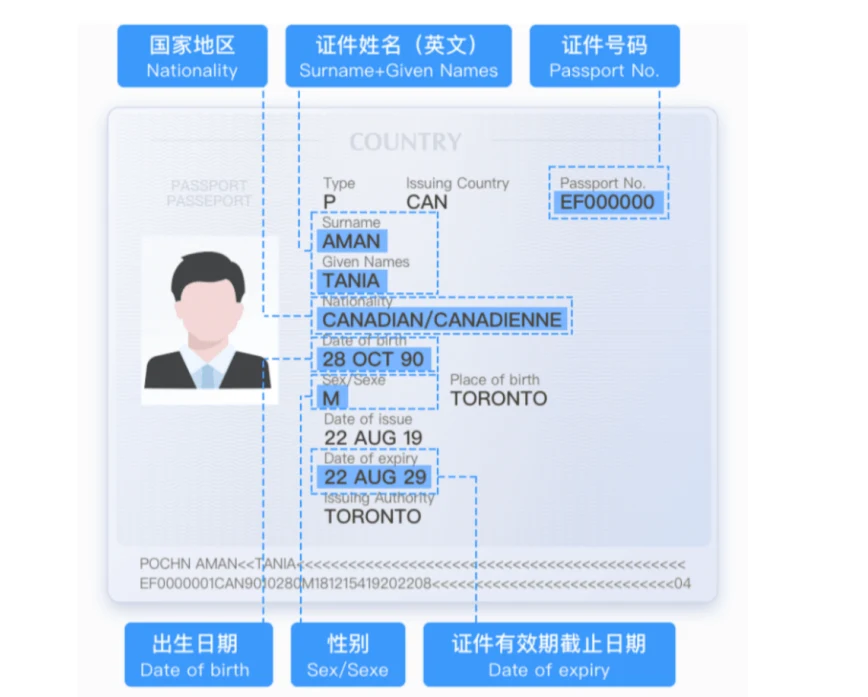
Read the passport registration and SIM activation guideDownload from the provider
If you decide a VPN is appropriate, use its official website or app-store link before departure. Proton VPN is an example here, not a promise that it will work in mainland China. Open the iPhone or Android guide below.
Follow the connection prompts
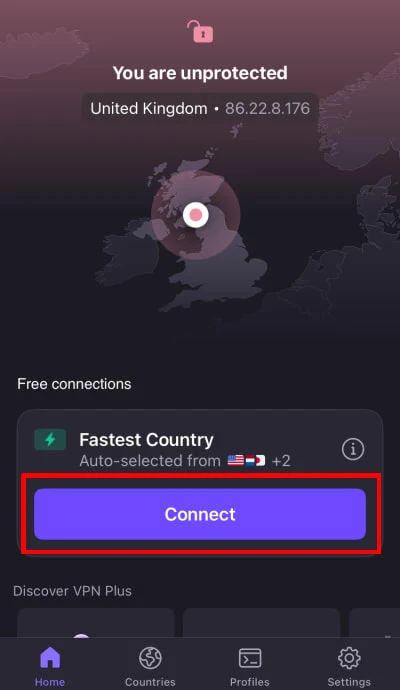
For the illustrated Proton VPN iPhone app: sign in, or use guest mode if offered. Select Connect. iOS may ask to add a VPN configuration; review the request. Use the app’s connection status to check the result.
Test and keep a backup
Test your essential apps before departure. Save your hotel address, rail booking and contact details offline. If a connection fails in China, use your carrier or provider’s official support rather than relying on a single tool.
Follow the official illustrated walkthrough.
Use the links below for the current device-specific screens. We have not added an unverified third-party video.
Sources & current instructions
- Proton VPN · official iPhone / iPad walkthrough
- Proton VPN · official Android walkthrough
- UK government · China internet-access advice
Illustrations are dated references, not live app screens. Recheck the official instructions before travel. No affiliation or endorsement is implied.